


This section contains answers for frequent questions regarding the ordering process of Backup4all.
On this page:
- How will the software be delivered after I pay for it?
- Do you offer enterprise licensing?
- Can I order Backup4all using a free email address (Yahoo, Gmail, AOL, Hotmail)?
- Are the Upgrades free?
- I have paid but not received my registration code. What should I do?
- I purchased the commercial version, but still getting the message that Backup4all is unregistered
- Are the Updates free?
- I do not have a credit card, can I still purchase Backup4all?
- Do I need to activate Backup4all?
- Are there volume license discounts?
- My e-mail address has changed. Does Softland need to know about it?
- How can I pay for Backup4all?
- Which company handles the credit card verification and payment?
- Where can I find my key?
How will the software be delivered after I pay for it?
Delivery time of your licenses depends on the payment method used:
- For credit card payments, licenses will be delivered via email after the validation of your credit card (no more than 48 hours after you place your order).
- For PayPal payments, licenses are delivered via email in up to 48 hours. Please note that only Shareit supports PayPal payments. Select Shareit in the "Buy from" drop-down to pay via Paypal.
- For wire transfer payments, licenses are delivered via email after receipt of funds (3-4 days).
- For local bank transfers, licenses are delivered via email after the receipt of money (5-7 days).
- For purchase orders delivery time depends on your company's payment terms. Software is delivered only after full payment is received.
Backup4all is delivered through ESD (electronic software delivery), meaning you will receive an email with instructions to download and license it, so no physical deliveries.
Do you offer enterprise licensing?
For large enterprise businesses needing more than 1000 licenses we recommend the regional licensing solution, especially suitable for companies that need unlimited usage in a region: site, country or even worldwide.
There are three types of regional licenses: Site, Country and Worldwide site license. It's easy to choose which one is suitable given that all relate to where your company has the offices Backup4all will be used into. Each license type mentioned below is available for all Backup4all editions (Lite, Standard, Professional and Portable).
Site license means that unlimited copies of Backup4all can be installed and registered in an organization, company or other entity, whose offices are located within the borders of one statoid (defined as a "major administrative division of your country" – such as state, province, region, governorate, prefecture, district). For instance if you are an US based company that has offices only in the state of Texas, you can purchase one site license and anyone in your company can use Backup4all.
Country license means that unlimited copies of Backup4all can be installed and registered in an organization, company or other entity whose offices are within the borders of one country. For example if your company has 100 offices in USA and you buy one country license, anyone within your company can use Backup4all.
Worldwide license means that unlimited copies of Backup4all can be installed and registered in an organization, company or other entity with offices all over the world. For instance if your company has offices in 20 countries and you buy one worldwide license, anyone within your company can use Backup4all.
For pricing information or any other inquiries contact us (include in the email beside the license type also the edition you want this for - Portable, Lite, Standard, Professional).
Can I order Backup4all using a free email address (Yahoo, Gmail, AOL, Hotmail)?
Yes, you can choose to use your free email address to order Backup4all.
If there are problems during your order or want more details about payment, please contact us at <[email protected]>
Are the Upgrades free?
Backup4all upgrades are paid. Upgrades are changes in the major version number of the product. For example, Backup4all v8.0 is an upgrade from Backup4all v7.9. The frequency of releasing major versions is once every 1-2 years.
I have paid but not received my license key. What should I do?
If you have paid by credit card / debit card, wire transfer during the online order process, or placed a purchase order, the email with licensing details should be delivered immediately. If you didn’t receive an email with licensing details please contact us. If you have chosen a payment method different than the ones described above, the delivery of Backup4all will be done after the payment processor confirms the receipt of payment.
I purchased the commercial version, but still getting the message that Backup4all is not activated
After you purchase the commercial version you have to copy and paste the licensing key exactly as displayed in the email you received and activate the program.
Are the Updates free?
Yes, the minor Updates are free if you are a registered user of Backup4all. Updates are defined as changes in the minor version number of the product. For example, Backup4all v8.2 is an update from v8.0. The frequency of releasing updates is once every 1-2 months.
I do not have a credit card, can I still purchase Backup4all?
Yes, you can still purchase Backup4all using one of the other payment methods (bank/wire transfer, checks, cash - prepayment). Just select it from the Method of Payment drop-down menu on the ordering page of the payment processor (after you clicked the buy link from the buy now page on our site).
Do I need to activate Backup4all?
Yes, Backup4all needs to be activated. Once you enter the license information you received upon purchase, Backup4all will guide you through the simple process of activation.
Please note Backup4all has to be periodically reactivated. The reactivation will be made automatically in background every 30 days, if you activated Backup4all online. If you manually activated Backup4all, you will have to manually reactivate Backup4all every 3 months.
Are there volume license discounts?
Yes, we have a volume license discount program available. If you buy more than 2 licenses of Backup4all you can benefit from an important discount. For more information please visit the Buy Now page and click on Volume Discounts.
My e-mail address has changed. Does Softland need to know about it?
Yes, if you have changed the e-mail address you used to Order Backup4all, please send us an e-mail with the new e-mail address at: [email protected]
How can I pay for Backup4all?
Our payment processors accept the following payment methods:
- Credit cards (Visa, MasterCard, American Express, JCB, Discover and Diners Club are accepted)
- PayPal
- Wire transfer
- Checks/Money Orders
- Purchase Orders
- Cash money (accepted by mail transfer)
- Skrill (Moneybookers)
Which company handles the credit card verification and payment?
Credit card verification and payment is handled by our payment processors. Their order process is protected via a secure connection so that the data sent to the recipient can only be read by the recipient (you can tell that the Order page is protected because the URL displayed in the address bar begins with "https:"). Important information such as credit card numbers, addresses, etc. is sent to the recipient (or received) securely via the Internet. All of the data entered on the protected pages is encrypted using the SSL (Secure Socket Layer) protocol.
Where can I find my key?
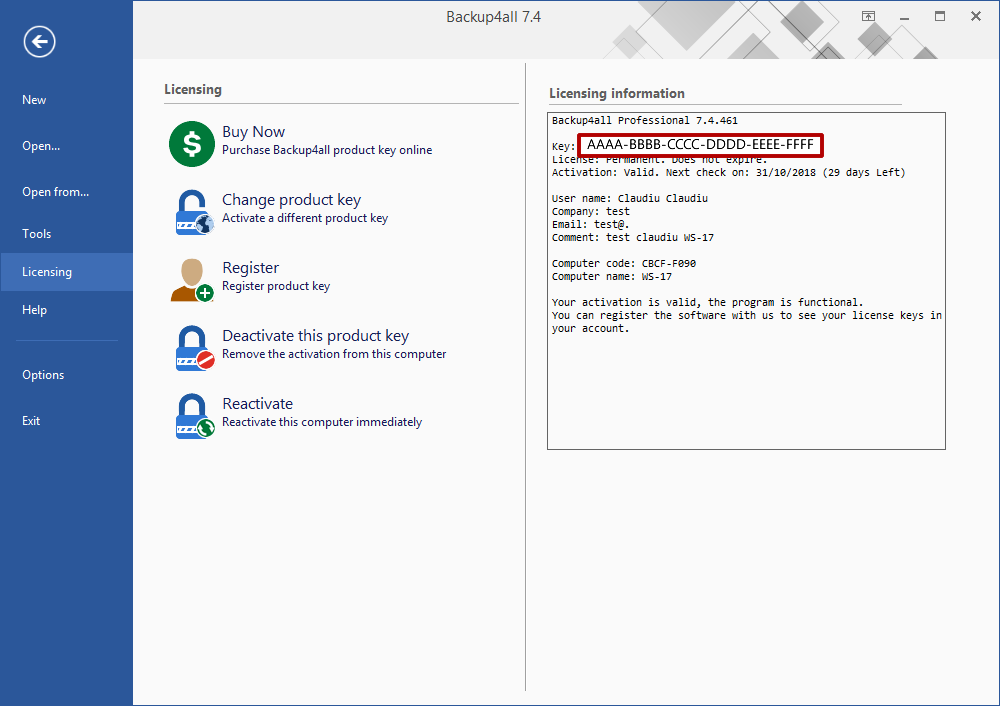
Backup4all 6.x/7.x/8.x
To find your Backup4all key, open Backup4all, go to File -> Licensing and copy the groups of characters that show after the Key text on the Registration information section, just like shown in the image below:
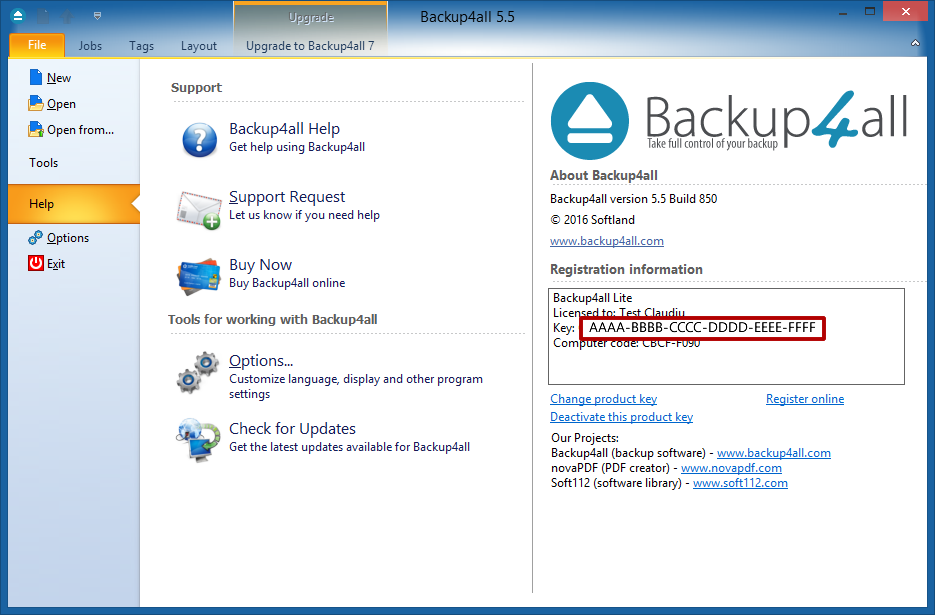
Backup4all 5.x
To find your Backup4all 5 key, open Backup4all, go to File -> Help and copy the groups of characters that show after the Key text on the About section.
Backup4all 4.x or previous
In order to find your Backup4all registration key, open Backup4all, go to Help -> About and copy the groups of characters that show after the Registration Key: text.
Note: This is only your partial key which is needed if you want to upgrade. Your full registration key is only in the email message you received after your order was processed. If you want to reinstall Backup4all and need the full key but don't have the order email, you can Contact Us and we'll provide it after authenticating you.