


The full backup type copies all selected files and folders. Full backup is time consuming (when compared to incremental and differential backup types), but it allows the fastest and easiest restore. It is the starting point of all other backup types.
What is a full backup?
A full backup copies all the specified files to another location, usually an external hard drive or a remote location (like cloud storage). Full backups are typically used less often than incremental or differential backups, because they take longer to complete and require more storage space.
Because the full backup stores all files and folders, restore operations are easier and faster when compared with other backup types.
It would be ideal to make full backups all the time, because they are the most comprehensive and are self-contained. However, the amount of time it takes to run full backups often prevents us from using this backup type. Also, storing full backups might fill up the backup storage quickly. Thus, Full backups are often restricted to a weekly or monthly schedule, although the increasing speed and capacity of storage device (or cloud storage) is making overnight full backups a more realistic proposition.
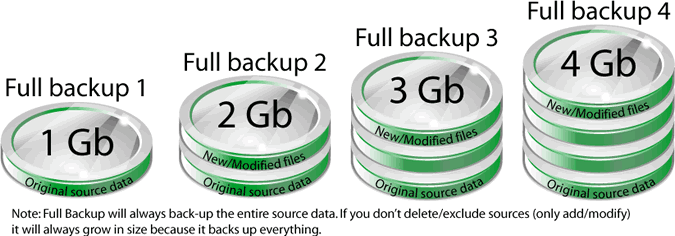
A single full backup provides the ability to completely restore all backed-up files and folders, as exemplified in the image below:
If you use a backup program to make full backups, it is important to make sure it supports encryption to protect the backed-up data. This is because if the backup storage is illegally accessed, stolen or lost, the entire copy of your data could be in the hands of unauthorized persons.
Backup4all can create full backups, which creates a single compressed file per source drive. You can use the "Limit number of stored backups" option to save storage space (Advanced mode), and AES encryption to protect the stored files.
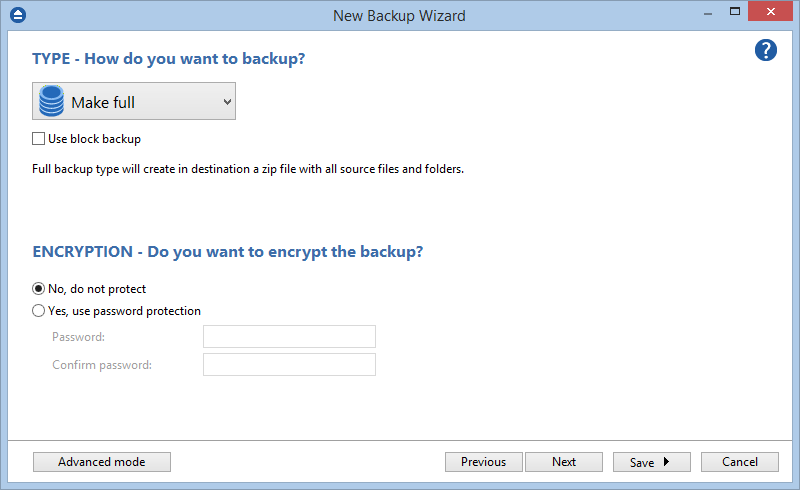
Please note that Backup4all does not perform full system backup as it was designed for data files backups only.
What are the advantages of full backup?
- Restore is fast and easy.
- It stores files in one compressed file per device.
- Full backup contains all files needed to do a restore.
What are the disadvantages of full backup?
- It takes more time to complete when compared to incremental backup or differential backup types.
- Storing multiple full backups can quickly fill up the backup storage.
What differences are between full and incremental backup?
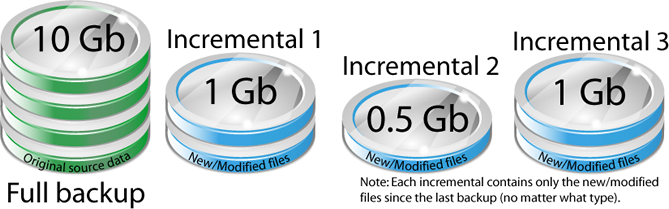
A full backup copies all source files and folders every time you run the backup, regardless of whether the source files have been changed since the last backup. An incremental backup only copies files that are new or have been modified since the last backup.
If you have only few files new/modified every day, the incremental backup type is recommended. Otherwise, if there are many files new/modified and you run incremental backups, in a short time the backup increments could exceed the full backup in size.
Incremental backup is a more efficient option than a full backup (uses less backup space), but it can be more difficult to restore.
It's a good idea to have a backup strategy in place where full backups are performed weekly, and faster backup types (such as incremental) are executed daily.
What differences are between full and differential backup?
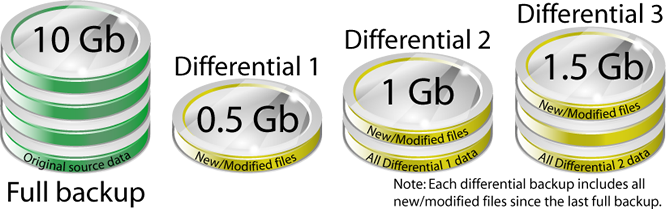
A full backup copies all source files and folders every time you run the backup, regardless of whether the source files have been changed since the last backup. A differential backup only copies files that are new or have been modified since the full backup.
Differential backup compares with last full backup, so successive differential backup includes duplicates of the files copied by previous differential.
The differential backup is usually faster and takes up less storage space than a full backup.
What differences are between full and mirror backup?
The full backup type copies all files and folders in one compressed file per drive, while the mirror backup type copies all files and folders without compression, resulting in an exact copy of the source files.
On future backups, the full backup will copy all files every time, while the mirror backup type will only copy new and modified source files to the backup storage, overwriting the previously copied files.