


The differential backup contains all files that have changed since the last FULL backup. The advantage of a differential backup is that it shortens restore time compared to a full backup or an incremental backup. However, if you perform the differential backup too many times, the size of the differential backup might grow to be larger than the baseline full backup.
There is a significant, but sometimes confusing, distinction between differential backup and incremental backup. Whereas incremental backs up all the files modified since the last full backup, differential or incremental backup, differential backup offers a middle ground by backing up all the files that have changed since the last full backup.
That is where it gets its name: it backs up everything that's different from the last full backup.
In the image below you can see an example of how a differential backup would look like for a backup job that runs four times:
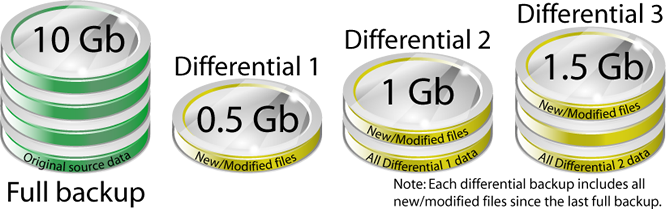
Restoring a differential backup is a faster process than restoring an incremental backup because only two backup container files are needed: the latest full backup and the latest differential.
Backup4all uses the information it has recorded in its catalog file (.bkc) to determine whether each file has changed since the last full backup.
Use differential backup if you have a reasonable amount of time to perform backups. The upside is that only two backup container files are needed to perform a complete restore. The downside is if you run multiple differential backups after your full backup, you're probably including some files in each differential backup that were already included in earlier differential backups but haven't been recently modified.
Advantages:
- Restore is faster than restoring from incremental backup
- Backing up is faster than a full backup
- The storage space requirements are lower than for full backup
Disadvantages:
- Restore is slower than restoring from a full backup
- Backing up is slower than the incremental backup
- The storage space requirements are higher than for the incremental backup
Backup4all supports the differential backup type and offers a solution for the slow backup issue.
In time, the differential can grow to a size that is equal to or larger than with the full version. Therefore the following options can be used to trigger the creation of a new full backup:
- Make a full backup when differential zip size exceeds ...% of the full backup (default is 50%)
- Make a full backup when differential zip size exceeds ... (default is 1MBytes)
The system counts the file sizes for the *differential backup* and if the selected condition is met it performs a full backup.