


Backing-up is a crucial process that everyone should do in order to have a fail-safe, for when the inevitable happens. The principle is to make copies of particular data in order to use those copies for restoring the information if a failure occurs (a data loss event due to deletion, corruption, theft, viruses, etc.)
You can perform the backup manually by copying the data to a different location or automatically using a backup program. Each backup program has its own approach in executing the backup, but there are four common types of backup implemented and generally used in most of these programs: full backup, differential backup, incremental backup and mirror backup. A type of backup actually defines how data is copied from source to destination and lays the grounds of a data repository model (how the back-up is stored and structured).
The table below provides an overview comparison between these backup types, for detailed information about each read the rest of the article:
| Backup type | Date backed up | Backup time | Restore time | Storage space |
|---|---|---|---|---|
| Full backup | All data | Slowest | Fast | High |
| Incremental backup | Only new/modified files and folders | Fast | Moderate | Lowest |
| Differential backup | All data since last full | Moderate | Fast | Moderate |
| Mirror backup | Only new/modified files and folders | Fastest | Fastest | Highest |
| Smart backup | Automatically decided by algorithm | Fast | Fast | User-set limit |
Incremental backup is the recommended backup type.
Full backup type
A full backup stores all files and folders that exist in the backup source. In Backup4all, the full backup is the starting point for all other types of backups and contains all the data in the folders and files that are selected to be backed up. Because full backup stores all files and folders, frequent full backups result in faster and simpler restore operations. Remember that when you choose other types of backup, restore jobs may take longer. As an example, for a full backup job that runs four times the representation below is conclusive on how the backed up data will grow with every run:
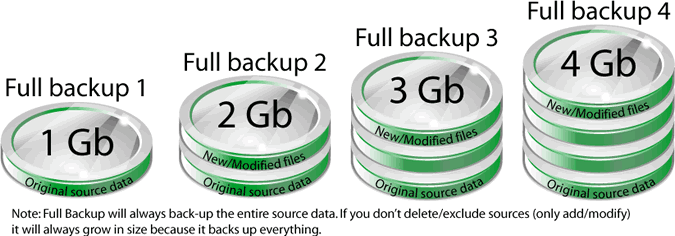
Since this is the foundation of all other backup types, a detailed article explains it thoroughly: What is a full backup?
Differential backup type
The differential backup contains all files that have changed since the last FULL backup. The advantage of a differential backup is that it shortens restore time compared to a full backup or an incremental backup. However, if you perform the differential backup too many times, the size of the differential backup might grow to be larger than the baseline full backup. In the image below you can see an example of how a differential backup would look like for a backup job that runs four times:
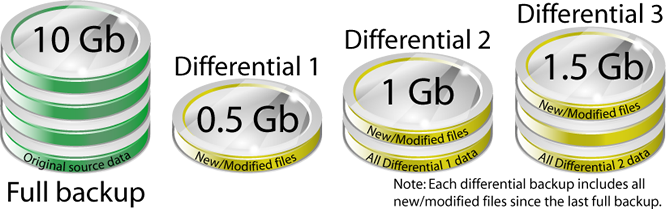
Read the differential backup page for more details.
Incremental backup type
Incremental backup stores all files that have changed since the last FULL, DIFFERENTIAL OR INCREMENTAL backup. The advantage of an incremental backup is that it takes the least time to complete. However, during a restore operation, each incremental backup must be processed, which could result in a lengthy restore job. The representation below shows how a backup job running four times would look like when using incremental:
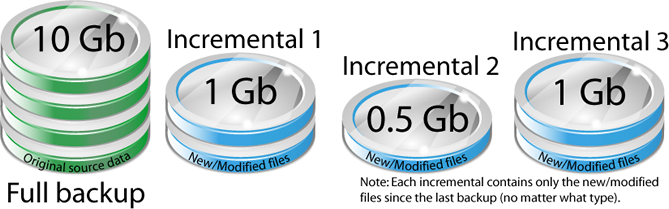
This is one of the most popular backup types.
Mirror backup type
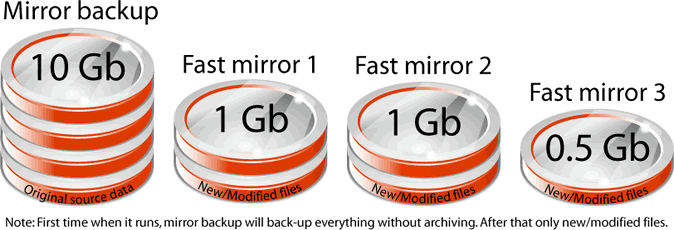
The mirror backup is identical to a full backup, with the exception that the files are not compressed in zip files and they can not be protected with a password. A mirror backup is most frequently used to create an exact copy of the source data. It has the benefit that the backup files can also be readily accessed using tools like Windows Explorer. The image below shows how a mirror backup job would look after four iterations (the first mirror will backup everything, subsequent fast mirror backups will backup only new/modified files):
Smart backup type
Smart backup is a backup type which combines the full, differential and incremental backup types with cleanup operations in order to efficiently manage the backups in accordance with the backup settings and the free disk space in the destination. The Smart backup type starts with a full backup. The advantage is that you don't need to worry about the number of backups to store in order to fit on the destination drive, which backup version to clean or merge, as Backup4all will take care of that.
| Backup No. | Action | Smart | Incremental | Differential |
|---|---|---|---|---|
| 1 | add 2 GB | 2GB - Full | 2GB - Full | 2GB - Full |
| 2 | modify 500 MB | 500 MB - Incr | 500 MB - Incr | 500 MB - Diff |
| 3 | modify 500 MB | 500 MB - Incr | 500 MB - Incr | 1000 MB - Diff |
| 4 | modify 500 MB | 500 MB - Diff | 500 MB - Incr | not enough space |
| 5 | modify 500 MB | 500 MB - Incr | 500 MB - Incr | |
| 6 | modify 500 MB | 500 MB - Diff & backup 2 and 3 are deleted | not enough space | |
| 7 | modify 500 MB | 500 MB - Incr | ||
| 8 | modify 500 MB | 500 MB - Diff & backup 4 and 5 are deleted | ||
| 9 | modify 500 MB | 500 MB - Incr | ||
| 10 | modify 500 MB | 500 MB - Diff & backup 4 and 5 are deleted | ||
| never gets full |
For details visit the mirror backup page.
Types of backup implemented in Backup4all
Backup4all is one of the pioneer backup applications that implemented all four fundamental backup types. It is able to keep track of the files added/modified/deleted in a unique way as Backup4all stores a summary snapshot of the file information into a backup catalog file (.bkc). Each time a backup job is run the catalog file is updated. For every file backed up, the snapshot contains the file name, size, and attributes as well as the date and time of creation, modification, and access.
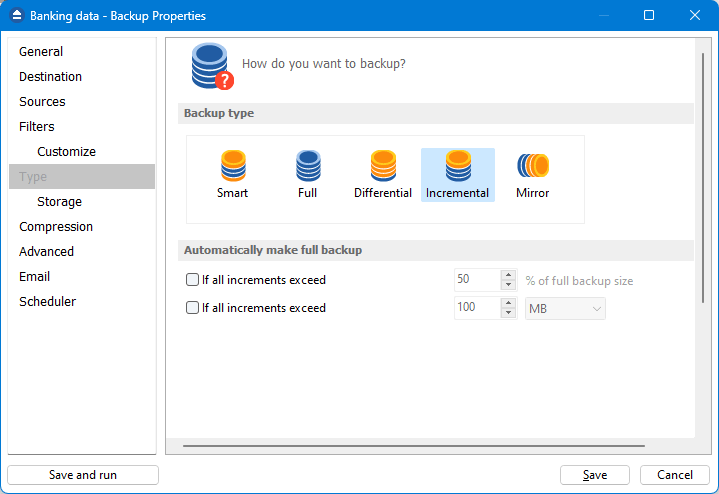
This method of keeping track of files is the most accurate one. In contrast, some other backup applications inspect each file's Archive flag to identify which files have been modified. Backup4all will not interfere with any other backup software, because it does not read or change the Archive flag.