


Incremental backup stores all files changed since the last FULL, DIFFERENTIAL OR INCREMENTAL backup. The advantage of an incremental backup is that it takes the least time to finish. The disadvantage is that during a restore operation, each increment is processed and this could result in a lengthy restore job.
What is an incremental backup?
Incremental backup is a backup types that provides a faster method of backing up data than repeatedly running full backups. During an incremental backup, only files changed since the most recent backup are included. That is where it gets its name: each backup is an increment for a previous backup.
The representation below shows how a backup job running four times would look like when using incremental:
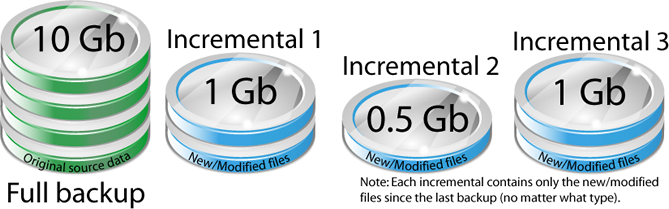
The time it takes to execute the backup may be a fraction of the time it takes to perform a full backup. Backup4all is a backup program that supports incremental backup, and it uses the information recorded in its catalog file (.bkc) to determine whether each file has changed since the most recent backup.
The advantage of lower backup times comes with a price: increased restore time. When restoring from incremental backup, you need the most recent full backup as well as EVERY incremental backup you've made since the last full backup.
For example, let's assume you did a full backup on Friday and incremental backups on Monday, Tuesday and Wednesday. If you need to restore your backup on Thursday morning, you would need all four backup container files: Friday's full backup plus the incremental backup for Monday, Tuesday and Wednesday. By comparison, if you had run differential backup on Monday, Tuesday and Wednesday, then to restore on Thursday morning you would have needed only Friday's full backup plus Wednesday's differential.
What types of incremental backups are there?
There are several approaches to doing incremental backups, and that creates multiple types of incremental backups as explained below:
- Block level backup - this type will back up only the modified parts of the file, instead of backing up the entire file. It is useful for large files whith few changes.
- Byte level backup - this type is similar to block level backup, but it based on the binary variation of the file, compared to previous backup. It uses the minimum unit to determine the part of the file to be backed up.
- Reverse incremental - The reverse incremental backup method produces a backup chain that consists of the last full backup file and a set of reverse incremental backup files preceding it. Thsi way, the most recent restore point in the backup chain is always a full backup, and it gets updated after every successful backup job execution.
- Multilevel incremental - this is a more sophisticated incremental backup scheme which involves multiple numbered backup levels. A full backup is level 0. A level n backup will back up everything that has changed since the most recent level n-1 backup. Suppose for instance that a level 0 backup was taken on a Sunday. A level 1 backup taken on Monday would include only changes made since Sunday. A level 2 backup taken on Tuesday would include only changes made since Monday. A level 3 backup taken on Wednesday would include only changes made since Tuesday. If a level 2 backup was taken on Thursday, it would include all changes made since Monday because Monday was the most recent level n-1 backup.
- Incremental forever - this type is similar to the synthetic backup concept. After an initial full backup, only the incremental backups are sent to a centralized backup system. This server keeps track of all the increments and sends the proper data back to the client during restores.
What are the advantages of incremental backups?
- It is the fastest backup type since it only backs-up increments
- Saves storage space compared to other types
- Each backup increment can store a different version for a file/folder
What are the disadvantages of incremental backups?
- Full restore is slow compared to other backup types (you need the first full backup and all increments since then)
- To restore the latest version of an individual file the increment that contains it must be found first
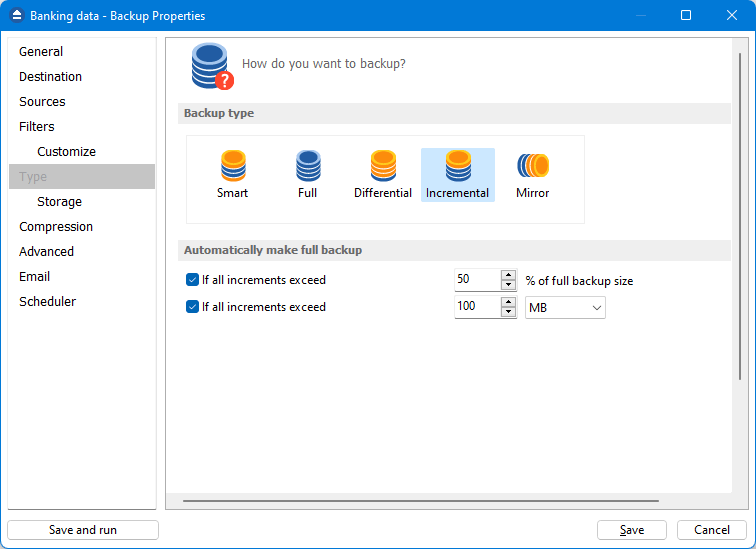
Backup4all supports incremental backups and offers a solution for the slow restore disadvantage. To keep the number of stored increments to a reasonable value and reduce the size of the backups, Backup4all provides two options: Limit the number of backups and Merge backups that can limit the number of stored backups. These two options will perform an internal merge to keep the number of stored incremental backups under the selected limit.
Incremental backup vs differential backup
The advantage of Incremental backup compared with Differential backup, is that only new and modified files (since the last backup execution - no matter if it was full, differential or incremental) will be backed up. That will result in smaller backups.
The differential backup will always include all new and modified files since the last full backup, no matter if there were other incremental or differential backups executed since the last full. That will result in larger backups.
As for restore, the differential backup is faster as it needs only the most recent differential and the full, while the incremental backups will be restored one by one, to get the latest version of all files.
Full backup vs. incremental backup vs differential backup
Because there are different scenarios and cases, all backup types are usefull in different situations.
The Full backup is the starting point and it includes all files every time. The restore is fast as a single backup version is needed.
The Differential backup type includes all new and modified files since the last full. They are larger as they always compare to the last full. In case of restore, there are only 2 backup versions needed: the most recent differential and the most recent full.
The Incremental backup type includes all new and modified files since the last full, differential or incremental. It is the smallest backup type. When you need to restore an incremental backup, it will take longer as all backup versions since the last full to the latest incremental will be restored.